Tuesday, April 27, 2010

Get 10 GB for FREE


Beginning this week, MP3tunes will be offering a substantial 10GBs of music storage for free - enough to hold about 2,000 MP3 files. The goal is to store every internet user's music collection in the cloud and make it available everywhere they want to listen. This will require a massive expansion of our system but we're ready to make the jump from hundreds of thousands of users to tens of millions. If you'd like to receive an invitation, please get on the list here.

Increasing the free storage by 5X will create a surge in traffic. To manage the demand and growth we will be metering out invites to keep the flow manageable and to make sure we can offer an uninterrupted experience to existing users. Our team will be constantly monitoring storage and deploying more servers on a daily basis to handle the increased usage, so if you request an invite please be patient while we get to your request.

Thursday, March 4, 2010

MP3tunes 31% Faster!


We've been on a quest to make accessing your MP3tunes music library faster. On mobile phones where slow data connections abound it can be slow to browse your music collection so we've re-engineered certain parts of the MP3tunes system to focus on efficiency and improve speed. We just launched this new technology so devices connected to MP3tunes such as Android mobile phones and internet radios (Logitech, RCA, Reciva, etc) should see an immediate speed boost when browsing your music library. We've measure this and seen noticeable improvements around 30%. We have even more improvements planned for the future. The goal is to make cloud music as fast as your PC.

Friday, February 26, 2010

Build Your Own (BYO) Radio

We're excited to tell you about a new idea that we've been working on behind-the-scenes here at MP3tunes. It's a project we call "byo.fm" (which can mean build-your-own or bring-your-own radio).

Imagine having a customized radio station that plays all of your favorite songs as well as news, weather, sports, and more. We just launched this site today and are starting to beta test. We will be announcing it to the general public in the future but, we wanted you to know about it first. We would love to hear what you think about the concept.

The good news is that if you already have a MP3tunes account then your BYO station is ready to go! You just have to go through the BYO sign-up wizard the first time to configure your preferences. Then, you can start listening to your own station immediately. (Most new customers will have to upload their music before they can listen).

TRY IT OUT!
1. Go to http://www.byo.fm and click the "Audition your Music DJ" link.
2. On the sign up page where it says "Already have an account?" type in your MP3tunes email address and password.
3. Next, select all of your DJs and set your preferences. When you are done you should see a "My Station" page where you can listen to your music along with news, sports, weather, and more.

GIVE US FEEDBACK:

You can send your feedback to: support@byo.fm

Let us know what you think. Did you find any bugs? Do you have a suggestion for a new feature or source? Let us know!

One other thing that MP3tunes customers might be interested in is the new Locker upload software that we're working on called "Station Builder". (You can download it from the byo.fm web site). This program allows you to drag and drop files from your computer and easily upload them to your Locker. We are still in the early stages and there are bound to be bugs. If you find some please let us know.

We'd love hear your feedback. Let us know how byo.fm works for you!

The MP3tunes Team

Tuesday, February 23, 2010

MP3tunes Mobile Locker Tips and Tricks

If you have an Android phone or device we invite you to check out the FREE software that lets you listen to your MP3tunes music locker. Just go to the Android Market on your phone and search for "mp3tunes". Once you have it installed, just type your MP3tunes username and password and you have instant mobile access to your entire music locker! Learn more about the MP3tunes Mobile Locker for Android.

A lot of people have written to tell us how much they enjoy listening to their music on the go. We decided to post some tips and tricks that will make your experience even better:

  1. Download songs

    This is a recently added feature. (You can find out what version you're running by opening the Android Market and going to the "Downloads" tab. Then click MP3tunes and scroll down to find the number.) Starting in version 1.0.22 (alpha) we added a "Download" option. To find it, just navigate to a list of tracks. Then long-press on a track name and you'll see a new menu appear. Click on "Add track to local storage" to download.

    After the song finishes downloading you can navigate to the Android Media Player (called "Music") and the songs will be stored on your phone's local memory card. You can then use the Android media player to listen to songs even if you don't have a network connection. We plan to do a lot of work on this feature so stay tuned!

    The Android Media Player:


  2. Stop playing a song


    Another feature that we recently added is the ability to stop a song. You can see this option on the MP3tunes Mobile Locker Player screen. There is a square, 'STOP' button next to the play/pause button. Clicking this will stop the track and return you to the list of songs.

  3. This feature is actually located in two places: if you go to the Android menu button, you will also see an option to stop the currently playing track:


  4. Close the MP3tunes Mobile Locker program
    Some people have asked us about being able to quit, exit, or close the program. We have heard you loud and clear. To exit the MP3tunes Mobile Locker just navigate to the main screen (using the "menu" button in Android). Then, go to menu again and click "Logout". Once you are logged out the session will be closed. You can then click the "Home" button to return to your phone's start screen.


If you have any tips or tricks that you want to share with everyone send them along.

If you want to report bugs or suggest features you can go here.

If you're a developer, and want to get involved you can grab the source code here.

Thursday, January 28, 2010

MP3tunes Android Player: New And Improved!


We have been hard at work to improve the MP3tunes Android music player. The new Google Nexus One phone offers a lot of exciting new features with a big increase in speed. The increased memory and the 1 Ghz processor make quite a difference when listening to or streaming your Locker. If you have the older version of the Android Player we recommend upgrading to the latest version. The first time that you upgrade you will have to uninstall the existing software manually. To do this just go to the Home screen, then select Settings then Applications. Choose "Manage applications" and scroll down and find the MP3tunes Mobile Locker and click on it. Here you should see an "Uninstall" button. You can install the latest stable version by going to the Android Market. Just search for "mp3tunes". After you install the latest version, all future versions will offer you updates and upgrade automatically. (You won't have to uninstall the previous version each time). You can submit feature requests and bug reports here.

If you like beta testing software and want to see the latest cutting-edge version of the Android MP3tunes Player you can manually install it. To do this you have to enable the manual installation of software on Android. To do this, go to the Home screen and select Settings. Then go to Applications and check the box that says: "Unknown sources: Allow install of non-Market applications". Then, grab the latest version from http://mp3tunes.com/androidclient

If you manually install the beta version you will NOT get updates automatically. Each time you install the .apk file you will have to manually uninstall the previous version. The beta testing version may offer different features that aren't available in the stable version. But, it may also contain bugs. So, if you install the beta testing version we ask you to please report any bugs that you find to mp3tunes.android@gmail.com. If you're a developer you can download the latest version of the source code from the Google Code site. We are always looking for Android developers who want to contribute to the project.

Friday, September 18, 2009

Listen to your Locker on your iPhone

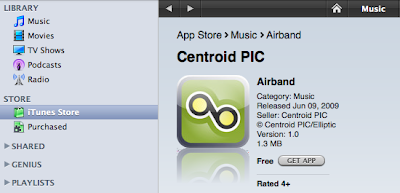
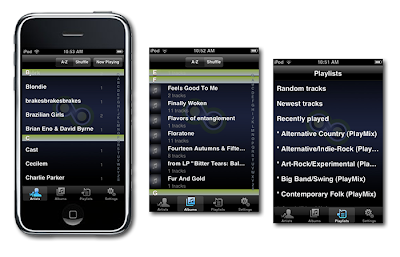
Now you can listen to your Locker on your iPhone! Just go to the iTunes App Store and install Airband. Type your email address and password and you can go beyond you iPhone or iPod's storage limit! Take all your music with you with MP3tunes and Airband.


If you have any feedback for the developers, please let us know: http://airband.uservoice.com

Tuesday, September 1, 2009

Your favorite tunes in the palm of your hand

The Logitech® Squeezebox™ Family + the Music Locker

Enjoy your Locker music and the world of Internet radio wirelessly on a variety of exciting Squeezebox™ models, including the new color-screen Squeezebox™ Radio and Squeezebox™ Touch.

Logitech® Squeezebox™ Radio connects to your home Wi-Fi network to bring a world of music to any space in your home. Tune in to thousands of free Internet radio stations, discover new music from services like MP3tunes, or listen to your personal digital music collection, including DRM-free iTunes Plus downloads. If you’re a Facebook you can
share music recommendations and see your friends’ statuses,
recommendations, and photos right on Squeezebox™ Radio.

Logitech® Squeezebox™ Touch. The color touch-screen Wi-Fi® music player that lets you discover a world of music. Listen to your personal digital music collection, discover new music from services like MP3tunes, and tune to thousands of Internet radio stations from all over the world—all through your stereo. An intuitive 4.3-inch color touch screen lets you easily select and play music, and view album art and photos. And support for high-resolution encoding gives you rich sound very little distortion.

Don't have a Music Locker? Get yours now so you can enjoy all of your music on the Squeezebox. Get 2 Gigs FREE - sign up now!

Don't have a Squeezebox? Find out more!